Showing posts with label Drafting. Show all posts

Wednesday, 13 May 2015

Digipak And Lyric Booklet: Final Cut

Within this I have made some very minor tweaks such as
  • moving the title
  • moving the artist name  


This is the final front cover of our lyric booklet


Magazine Ad: Draft 2 - Rock Inspiration For Q Magazine

We thought this would be a good image to use to target our audience in Q magazine. As it provides a certain amount of detail with the hair, but is kept simple and sophisticated and therefore is morelikely to attract an older audience, therefore targeting our secondary target audience. We chose a simple colour as well as using black and white in the QR code to keep the design minimalistic and stylish. The featured text has been coloured the various shades from the exact colours within the hair, using the eye dropper tool.


Friday, 24 April 2015

Digipak: Draft 6

Within this I have made some very minor tweaks such as:

  • moving the 'universal' logo around
  • moving the catalogue number
  • moving the title
  • moving the artist name 

Wednesday, 22 April 2015

Digipak Draft 5

Within this I have made some very minor tweaks such as:

  • reducing the font size of 'Scandal Us' 
  • Adding timings with the red lipstick colour therefore linking the front and back panels further
  • deleted the 'Gagas' out of the spine and re-alligned the text


Sunday, 19 April 2015

Digipak: 3rd Draft

Within this edit of the unpdated digipak, i have:

  • changed the font on the front cover of scadal us
  • made some stickers and placed them in an appropriate space
  • made more than one so audience feedback can dictate which one gets used
  • added a catalogue number to the spine
  • added icons to the social media handles and got rid of long un-user friendly urls
  • changed the font of the legal small print to something more legible 
  • changed the placing of the text on the front
  • added dvd logos as well as company logos


Thursday, 16 April 2015

Digipak: Stickers

Today I made some stickers for the front panel of the digipak. I made these in photoshop, this was performed in a series of steps. Below are some examples of what I created.


Born this way unicorn used and red colour from lipstick on front


the unicorn is also the logo for her 'littlemonster' fan site


These are the steps I took to create these stickers:


Tuesday, 24 March 2015

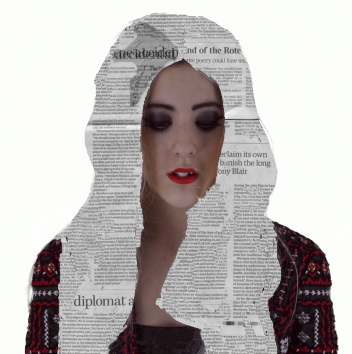
Digipak - Black And White - Potential Final Image


With a little more editing I feel this could be my final piece for the front panel of my digipak


Digipak - Black And White Newspaper - Tidy Up


I have been neatening up this image in photoshop. 


Digipak - Black And White Development


Lady Gaga Development 


Digipak - Black And White Development Using Smudge Tool


Another development using the smudge tool around the edges to create a more even finish


Add caption

DIgipak - Black and White Multiply Effect On Layers


Today I edited this picture using the same editing steps as seen in a previous blog post.


Digipak - Lady Gaga In Colour - Development


Developments made for this image. 


Digipak - Full Colour With Multiply Effect On Layers


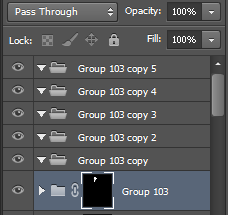
Photoshop edit this was created by turning the pieces of newspaper into black and white, adding them to the hair and then using the side bar to select Multiply instead of the default of Pass Through. 


Multiply effect 
layer selection - Multiply


layer selection (default) 
Default 

Digipak - Colour with Newspaper Hair


Photoshop edit of newspaper hair with coloured background